The Teacher Trainers
5 Free Tools to Supercharge Your ESL Lessons and Engage Students
Great ESL lessons do not need complicated technology or hours of preparation. Sometimes, the right free tool is all it takes to get students talking, participating and enjoying the learning process.
Whether you teach English online or in person, keeping students actively involved can be one of the biggest challenges in the classroom. When learners are engaged, they are far more likely to participate, practise new language and remember what they have learned.
The good news is that there are plenty of free digital tools that can make your lessons more interactive without adding extra work to your planning. Here are five practical options you can start experimenting with straight away.
What You’ll Learn
- How to make vocabulary and grammar reviews more interactive
- How to generate speaking activities with almost no preparation
- Where to find ready-made ESL games students can use immediately
- How AI can help you plan lessons and create activities faster
- How to choose technology that supports real classroom interaction
Part 1: Top 3 Websites That Make ESL Teaching Easier
1. Blooket : Turn Review Activities Into Games
Blooket takes familiar quiz questions and turns them into competitive classroom games. Students can answer vocabulary, grammar or comprehension questions while taking part in modes such as Gold Quest and Fishing Frenzy.
The competitive element can give even quieter learners a reason to participate. Instead of another worksheet or standard review exercise, students get an activity that feels more like a game while still practising the target language.

Why Blooket Works
- Encourages participation through friendly competition
- Makes vocabulary and grammar reviews more memorable
- Games can be created once and reused with future classes
- Works particularly well with children and teenagers
2. Topic Generator : Instant Speaking Prompts
Sometimes the hardest part of a speaking lesson is simply deciding what students should talk about. The Topic Generator removes that problem by providing random prompts at the click of a button.
It is especially useful when you want learners to practise spontaneous speaking rather than memorised answers. Use it for warm-ups, one-to-one lessons, pair work, small-group discussions or those moments when you unexpectedly have five minutes left at the end of class.
Why Topic Generator Works
- Keeps classroom conversations fresh and unpredictable
- Requires virtually no preparation
- Encourages spontaneous language production
- Helps learners develop fluency and speaking confidence
3. Wordwall : Interactive Quizzes, Games and Activities
Wordwall is one of those tools you can adapt to almost any ESL lesson. It allows teachers to create interactive quizzes, matching activities, spinning wheels, sorting tasks and other games, with printable options available for many activities too.
That versatility makes it useful across different ages and ability levels. You might use a matching game to review beginner vocabulary, a random wheel to generate speaking questions or a sorting task to practise grammar categories.
Why Wordwall Works
- Provides interactive alternatives to standard worksheets
- Can be used for grammar, vocabulary, speaking and review
- Activities can be adapted for different learner levels
- Offers multiple game formats using the same lesson content
4. GamesToLearnEnglish.com : Ready-to-Use Grammar and Vocabulary Games
When you need something students can start using immediately, GamesToLearnEnglish.com is a useful site to have bookmarked. It contains ready-made games covering vocabulary, sentence structure, word order, grammar and other core English skills.
One of its biggest advantages is simplicity. You can open a game and get started without spending valuable lesson time building an activity from scratch.
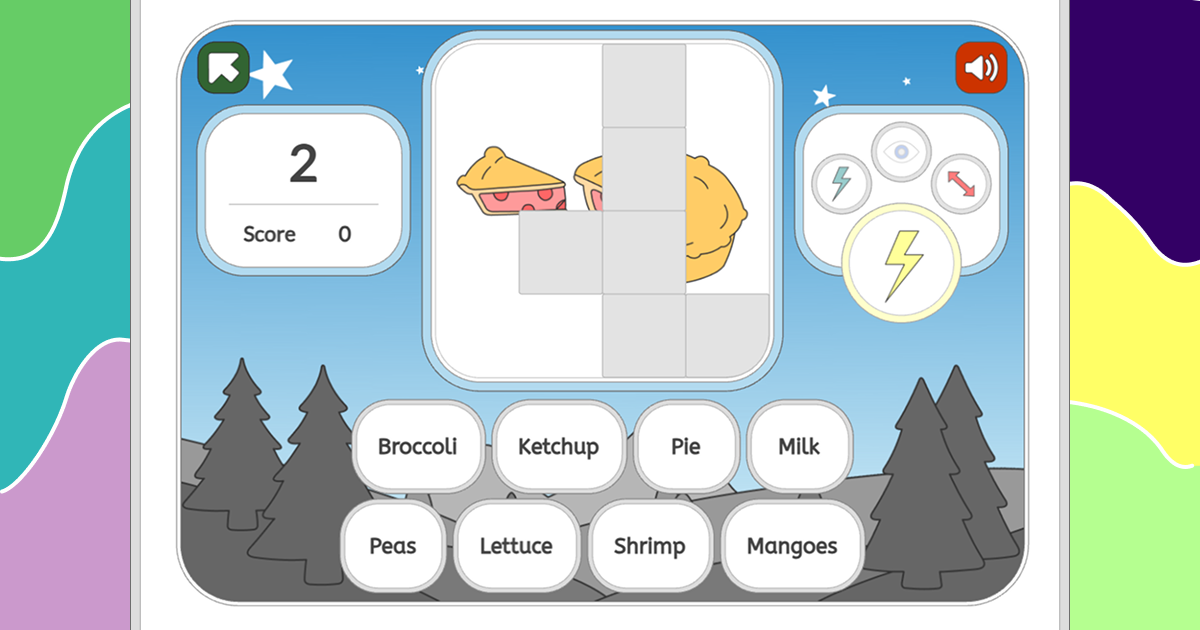
Why GamesToLearnEnglish Works
- Includes ready-to-use ESL games
- Useful for individual work, pairs or classroom activities
- Works well for warm-ups, review and unexpected extra time
- Instant feedback helps students recognise mistakes quickly
5. ChatGPT : Your AI Teaching Assistant
ChatGPT can become a useful planning assistant when you know how to give it clear instructions. Teachers can use it to brainstorm lesson ideas, produce discussion questions, generate example sentences, create quizzes or adapt activities for different proficiency levels.
For example, you could ask for a 45-minute lesson around travel vocabulary for A2 learners, request ten conversation questions for an advanced class or turn a grammar point into a quick review quiz.

Why ChatGPT Works
- Can dramatically reduce lesson-planning time
- Generates fresh activity ideas when inspiration runs low
- Can adapt materials for different ages and English levels
- Provides fast support when you need an activity during a lesson
Part 2: More Practical Ideas for Your ESL Classroom
Get More Ready-to-Use ESL Resources
Explore free teaching materials, practical activities and classroom tools you can use straight away.
The Best Tool Is the One That Supports Better Teaching
Digital tools can make lessons more exciting, but technology should support good teaching rather than replace it. A colourful game might grab students’ attention, but the real learning happens when the activity gives them meaningful opportunities to understand, practise and use English.
That is why effective ESL teachers think beyond the tool itself. They consider the lesson aim, the students’ level, the language being practised and what learners should be able to do by the end of the activity. Blooket might be excellent for reviewing vocabulary, while a topic generator may be more useful when the goal is fluency and spontaneous speaking.
Developing that judgement is an important part of becoming a confident teacher. Practical TESOL training helps you understand not only which activities to use, but why they work, how to adapt them and how to manage them effectively with real learners. That combination of classroom technique and practical experience can help you build real classroom confidence and gain the practical skills and recognised TESOL qualification needed to begin teaching English.
Quick Ways to Use These Tools This Week
- Use Blooket for a five-minute vocabulary review at the end of class.
- Open the Topic Generator when students need an unexpected speaking challenge.
- Turn your current grammar lesson into a Wordwall game.
- Use GamesToLearnEnglish.com as a warm-up or early-finisher activity.
- Ask ChatGPT to create three variations of an activity for different proficiency levels.
Final Thoughts
You do not need dozens of apps to create engaging ESL lessons. Start with one or two tools that solve a genuine classroom problem, experiment with them and pay attention to how your students respond.
Used thoughtfully, Blooket, Topic Generator, Wordwall, GamesToLearnEnglish.com and ChatGPT can help you increase participation, reduce preparation time and give students more opportunities to actively use English.
Keep Building Your ESL Teaching Toolkit
Discover more practical classroom ideas, teaching advice and resources from The Teacher Trainers.